

Advanced Options
Testomat.io Pipe
Section titled “Testomat.io Pipe”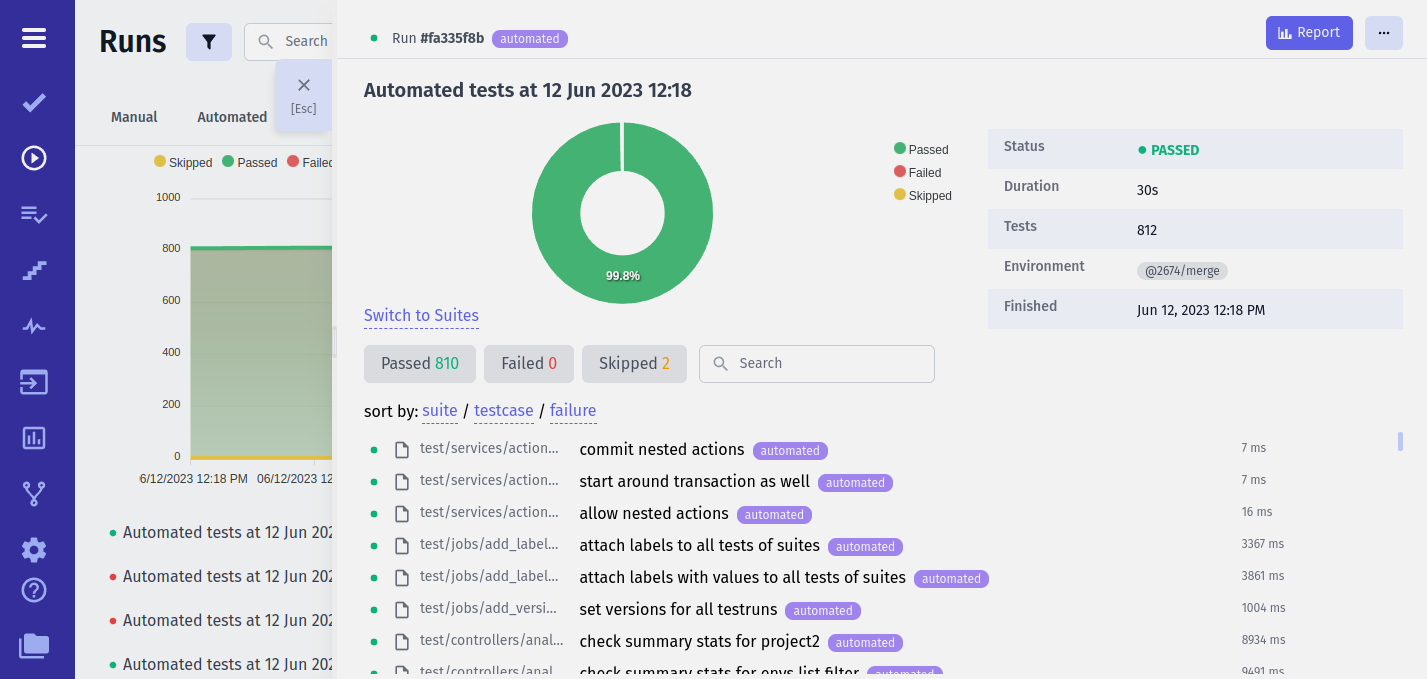
Testomat.io Pipe sends data to Testomat.io Application. Testomat.io provides free projects forever and unlimited test runs. Even it is a cloud application you can use it for free.
🔌 To enable Testomat.io pipe set TESTOMATIO environment variable with API key provided by Testomatio.
TESTOMATIO={API_KEY} <actual run command>Here are some possible use cases where you can use additional configuration on reporter:
- Create Unmatched Tests
- Add Report to Run by ID
- Do Not Finalize Run
- Setting Report Title
- Reporting Parallel Execution to To Same Run
- Adding Report to RunGroup
- Adding Environments to Run
- Starting an Empty Run
- Manually Finishing Run
- Setting Build URL
- Publish Run
- Assign Label To Run
- Create Jira Issue for Run
- Filter Tests
Create Unmatched Tests
Section titled “Create Unmatched Tests”Testomat.io will not create tests from the report if they have not been previously imported. To create tests during the report TESTOMATIO_CREATE option can be used:
TESTOMATIO={API_KEY} TESTOMATIO_CREATE=1 <actual run command>Add Report to Run by ID
Section titled “Add Report to Run by ID”This feature is widely used when a run is executed on CI.
A run is created before the test is started and it is marked as scheduled. Then
a report is assigned to that run using TESTOMATIO_RUN environment variable and {RUN_ID} of a run:
TESTOMATIO={API_KEY} TESTOMATIO_RUN={RUN_ID} <actual run command>Do Not Finalize Run
Section titled “Do Not Finalize Run”If multiple reports are added to the same run, each of them should not finalize the run.
In this case use TESTOMATIO_PROCEED=1 environment variable, so the Run will be shown as Running
TESTOMATIO={API_KEY} TESTOMATIO_PROCEED=1 TESTOMATIO_RUN={RUN_ID} <actual run command>After all reports were attached and run can be execute the following command:
TESTOMATIO={API_KEY} TESTOMATIO_RUN={RUN_ID} npx @testomatio/reporter finishSetting Report Title
Section titled “Setting Report Title”Give a title to your reports by passing it as environment variable to TESTOMATIO_TITLE.
TESTOMATIO={API_KEY} TESTOMATIO_TITLE="title for the report" <actual run command>Reporting Parallel Execution to To Same Run
Section titled “Reporting Parallel Execution to To Same Run”Provide a shared unique title to all runs that will be running in parallel, and add TESTOMATIO_SHARED_RUN environment var. So all reports will be sent to this run.
TESTOMATIO={API_KEY} TESTOMATIO_TITLE="report for commit ${GIT_COMMIT}" TESTOMATIO_SHARED_RUN=1 <actual run command>We recommend using a commit hash as a title to create a new Run. In this case we ensure that run title is unique and will be the same for all parallel jobs running exactly for this commit.
By default you can report to the same run if a run was created no more than 20 minutes ago. If you want to increase this time you can use TESTOMATIO_SHARED_RUN_TIMEOUT environment variable. TESTOMATIO_SHARED_RUN_TIMEOUTaccepts value in minutes, so to increase timeout to 2 hours (120 minutes) use the following command:
TESTOMATIO={API_KEY} TESTOMATIO_TITLE="report for commit ${GIT_COMMIT}" TESTOMATIO_SHARED_RUN=1 TESTOMATIO_SHARED_RUN_TIMEOUT=120 <actual run command>Adding Report to RunGroup
Section titled “Adding Report to RunGroup”Create/Add run to group by providing TESTOMATIO_RUNGROUP_TITLE:
TESTOMATIO={API_KEY} TESTOMATIO_RUNGROUP_TITLE="Build ${BUILD_ID}" <actual run command>Adding Environments to Run
Section titled “Adding Environments to Run”Add environments to run by providing TESTOMATIO_ENV as comma seperated values:
TESTOMATIO={API_KEY} TESTOMATIO_ENV="Windows, Chrome" <actual run command>Starting an Empty Run
Section titled “Starting an Empty Run”If you want to create a run and obtain its {RUN_ID} from testomat.io use the start command with --format id:
RUN_ID=$(TESTOMATIO={API_KEY} npx @testomatio/reporter start --format id)--format id keeps stdout to just the run id (banner and logs go to stderr), so {RUN_ID} is captured cleanly and can be passed to other jobs in a workflow.
When executed with
--launcha command provided by-cflag is ignored
Manually Finishing Run
Section titled “Manually Finishing Run”If you want to finish a run started by --launch use --finish option. TESTOMATIO_RUN environment variable is required:
TESTOMATIO={API_KEY} TESTOMATIO_RUN={RUN_ID} npx @testomatio/reporter finishSetting Build URL
Section titled “Setting Build URL”When running on CI reporter tries to detect automatically the URL of the current build. This URL will be set to Run report. Reporter automatically detects build URL for following CI services:
- GitHub Actions
- Azure Devops
- Jenkins
- CircleCi
- Gitlab CI
If you are using a different CI or you want to override build url run tests with BUILD_URL environment variable:
TESTOMATIO={API_KEY} BUILD_URL=<build-url> <actual run command>Publish Run
Section titled “Publish Run”To make report publicly available pass TESTOMATIO_PUBLISH=1 variable:
TESTOMATIO={API_KEY} TESTOMATIO_PUBLISH=1 <actual run command>Assign Label To Run
Section titled “Assign Label To Run”To assign a label to run, a label with scope runs must exist.
Then a label can be passed via TESTOMATIO_LABEL variable:
TESTOMATIO={API_KEY} TESTOMATIO_LABEL=release <actual run command>There is a way to pass a value to label via ::
TESTOMATIO={API_KEY} TESTOMATIO_LABEL="module:checkout" <actual run command>Or you can set multiple labels separating them with comma:
TESTOMATIO={API_KEY} TESTOMATIO_LABEL="release,module:checkout" <actual run command>Create Jira Issue for Run
Section titled “Create Jira Issue for Run”To automatically assign Run to Jira Issue pass the ID of that issue as TESTOMATIO_JIRA_ID variable
TESTOMATIO={API_KEY} TESTOMATIO_JIRA_ID={Jira_Issue_ID} <actual run command>For example, if your Jira issue id is TST-1, command should be:
TESTOMATIO={API_KEY} TESTOMATIO_JIRA_ID=TST-1 <actual run command>Filter Tests
Section titled “Filter Tests”Testomatio allows you to enhance your test execution with the option to filter and manage test runs based on various criteria. This can help you efficiently organize and execute your tests. Below, we explain how to use the --filter option in conjunction with Testomatio for customized test runs.
The filtering functionality for test execution is currently available for the following frameworks: Playwright & CodeceptJS.
To use the --filter option with Testomatio, follow the format:
TESTOMATIO={API_KEY} npx @testomatio/reporter run <actual run command> --filter 'testomatio:{filter-type}={filter-value}'Available Filter Types
Section titled “Available Filter Types”Tag Name Filter
Filter tests by tag names. Use this filter to select tests associated with specific tags.
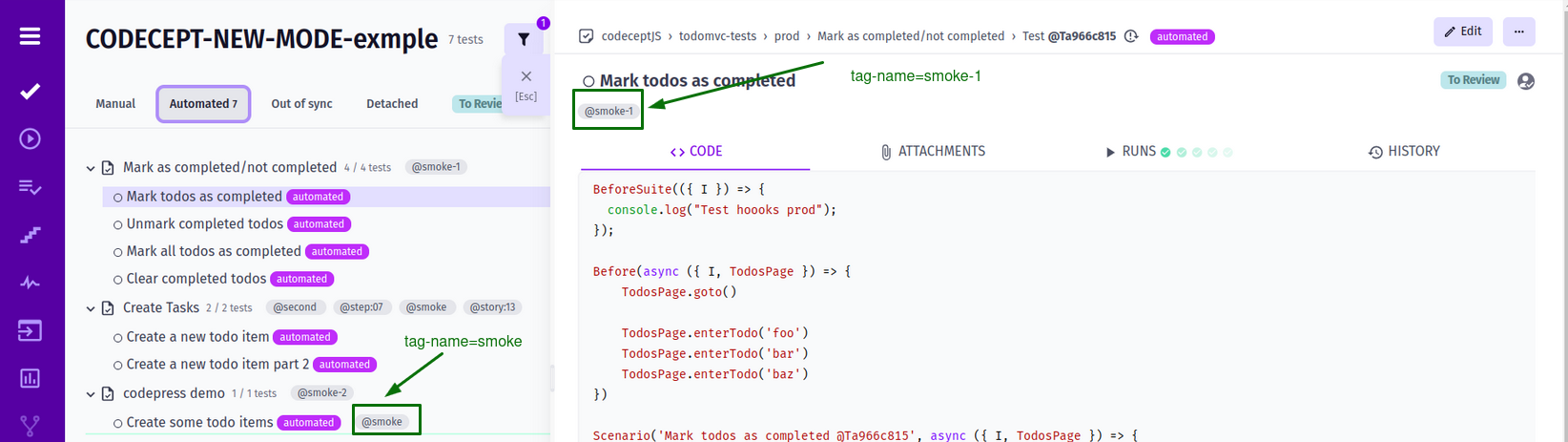
Command execution example
TESTOMATIO={API_KEY} npx @testomatio/reporter run 'actual run command' --filter 'testomatio:tag-name=smoke'Plan ID Filter
Filter tests by Testomatio plan IDs. Use this filter to organize and execute tests based on plan IDs.
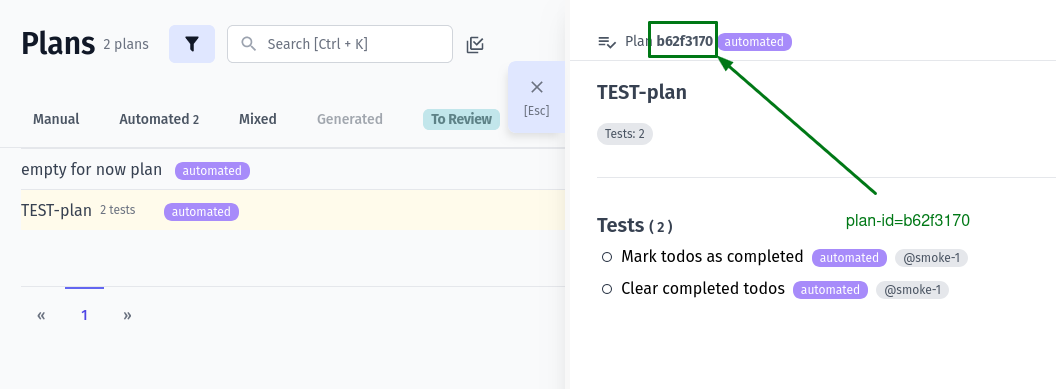
Command execution example
TESTOMATIO={API_KEY} npx @testomatio/reporter run 'actual run command' --filter 'testomatio:plan=b62f3170'Label Filter
Filter tests using custom labels. Labels allow you to categorize tests for better management and execution.
Label Filter (by label name) Example 1:
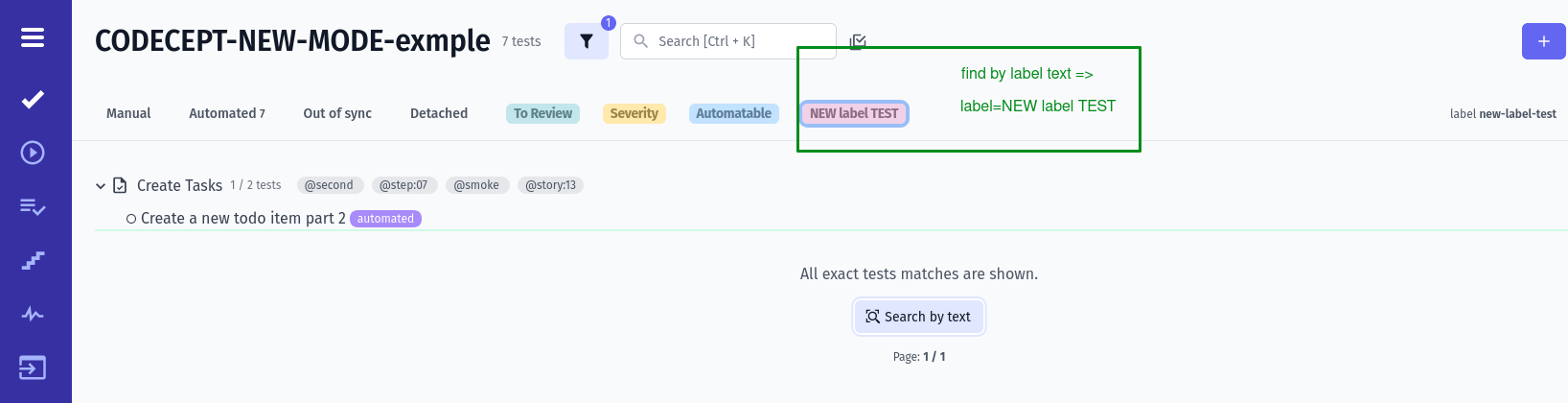
Label Filter (by label id) Example 2:

Another Label Filter Example 3:
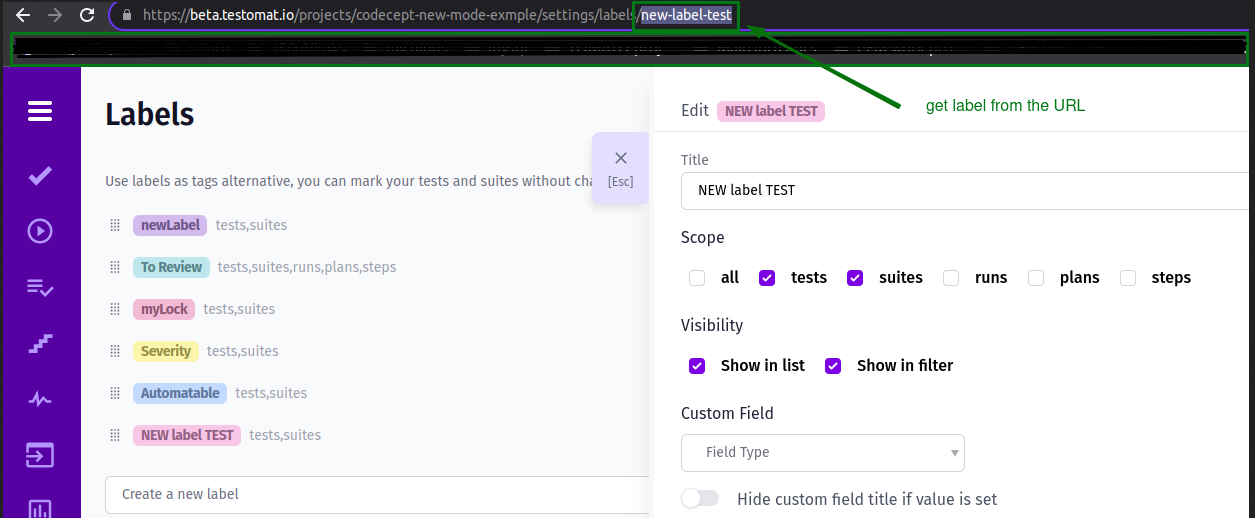
Command execution example
TESTOMATIO={API_KEY} npx @testomatio/reporter run 'actual run command' --filter 'testomatio:label=new-label-test'OR
TESTOMATIO={API_KEY} npx @testomatio/reporter run 'actual run command' --filter 'testomatio:label=NEW label TEST'Label Filter based on the Severity type
If you want to use a specific severity type, you should join the “severity” label id + severity type(e.g.: s1-id2:⛔ Blocker).
Here’s a list of available types that you can copy and add to the run command:
- ⚠️ Critical
- ⛔ Blocker
- 🔥 Major
- 👌 Normal
- ❄️ Minor
- 💤 Trivial
Label Filter Example based on the Severity type:
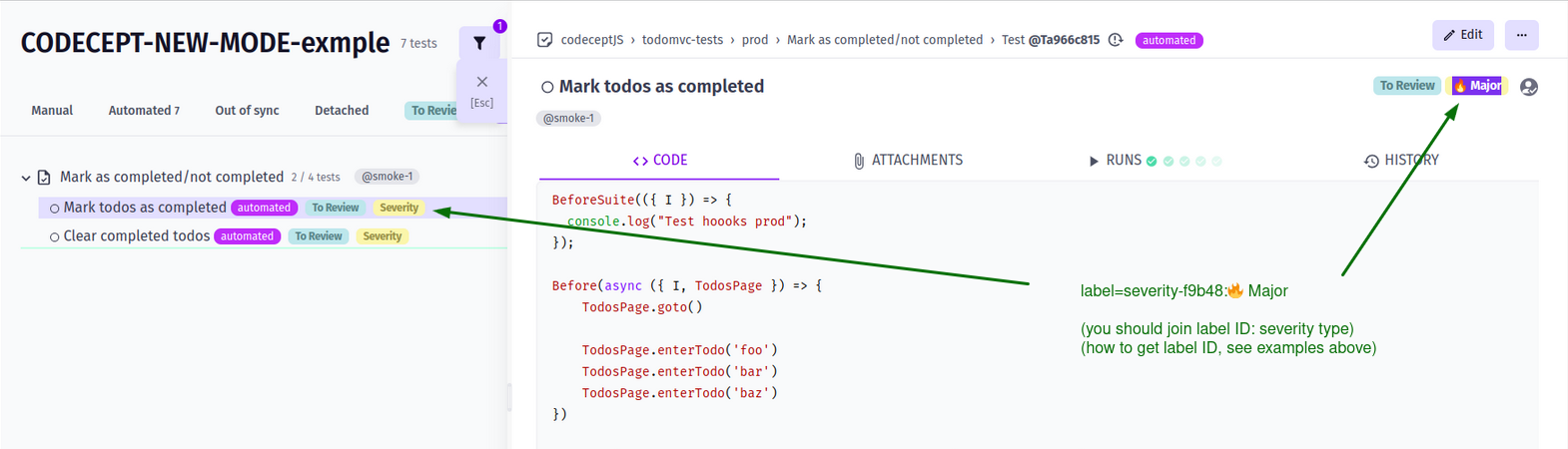
Command execution example
TESTOMATIO={API_KEY} npx @testomatio/reporter run 'actual run command' --filter 'testomatio:label=severity-f1b11:🔥 Major'OR
TESTOMATIO={API_KEY} npx @testomatio/reporter run 'actual run command' --filter 'testomatio:label=NEW label TEST:💤 Trivial'JIRA Ticket Filter
Filter tests linked to JIRA tickets. Use this filter to coordinate testing efforts with your JIRA workflow.
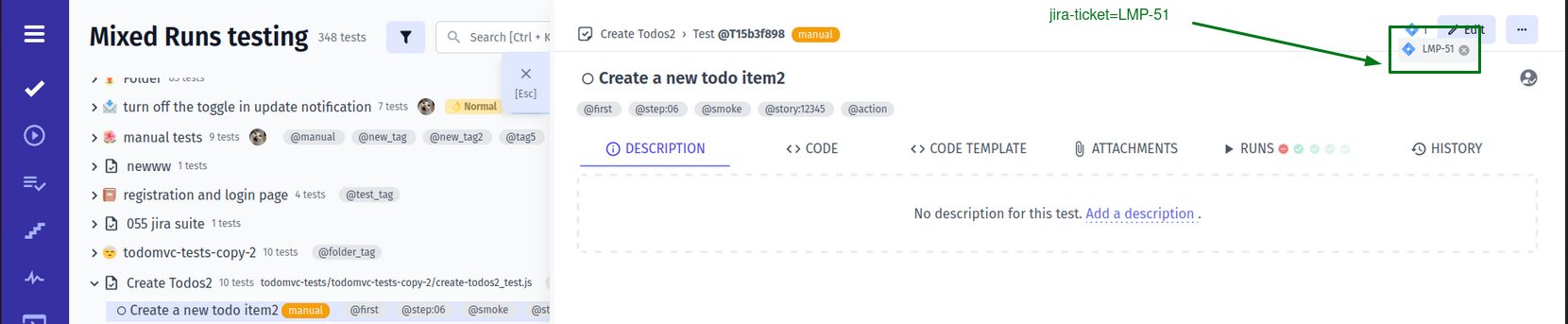
Command execution example
TESTOMATIO={API_KEY} npx @testomatio/reporter run 'actual run command' --filter 'testomatio:jira-ticket=LMP-51'📚 Example Usage
For instance, if you want to run tests with a specific label named “new-label-test,” you can use the following command:
TESTOMATIO={API_KEY} npx @testomatio/reporter run 'npx codeceptjs run' --filter 'testomatio:label=new-label'OR using Playwright:
TESTOMATIO={API_KEY} npx @testomatio/reporter run 'npx playwright test' --filter 'testomatio:label=new-label'Remember to replace {API_KEY} with your actual Testomatio API key and adjust the
<actual run command>according to your testing setup
It’s important to note that the provided filter value must match exactly the corresponding tag name, plan ID, label, or JIRA ticket for the desired tests
Please note, that this functionality allows you to easily filter and execute tests based on specific criteria, enhancing your testing experience.
Trigger a Remote CI Run
Section titled “Trigger a Remote CI Run”Instead of executing tests locally, you can ask Testomat.io to dispatch a CI workflow defined on the project. The reporter creates the run on the server, attaches the named CI profile (and any filter-resolved grep) to it, and exits — your CI is responsible for running the tests and reporting their results back into the same run.
This is useful for:
- Kicking off coverage-driven regression runs (e.g. only re-run manual or e2e tests whose source files changed in a PR) without juggling CI tokens locally.
- Running plan / tag / label-based suites from any environment without provisioning a local test runtime.
- Wiring
npx @testomatio/reporter run --remote ...into PR comments, dashboards, or chat-ops bots.
Prerequisites
Section titled “Prerequisites”- A CI profile configured on the project: in Testomat.io go to Settings → CI, pick a provider (GitHub Actions, GitLab CI, Jenkins, Bamboo, Bitbucket Pipelines, TeamCity, CircleCI, Azure DevOps), and save it under a name like
github. That name is what you pass to--remote. - A project API key (
TESTOMATIO=tstmt_...).
TESTOMATIO={API_KEY} npx @testomatio/reporter run --remote github

TESTOMATIO={API_KEY} npx @testomatio/reporter run --remote github \  --filter "coverage:file=coverage.manual.yml,diff=master"
TESTOMATIO={API_KEY} npx @testomatio/reporter run --remote gitlab \  --filter "testomatio:tag-name=smoke"
TESTOMATIO={API_KEY} npx @testomatio/reporter run --remote jenkins \  --filter "testomatio:plan=a123fb12"

TESTOMATIO={API_KEY} npx @testomatio/reporter run --remote github \  --remote-param branch=develop \  --remote-param REGION=eu
Equivalent env-var form (matches the existing TESTOMATIO_* configuration pattern — see Configuration):
TESTOMATIO={API_KEY} \TESTOMATIO_CI_PROFILE=github \TESTOMATIO_CI_PARAMS="branch=develop,REGION=eu" \ npx @testomatio/reporter run --filter "testomatio:tag-name=smoke"How the grep is built
Section titled “How the grep is built”When a filter is set, the testomatio / coverage pipe resolves it locally to a list of test ids (e.g. T123, S45). Those ids are joined with | and forwarded to the CI workflow under a grep config key. Your CI workflow then passes that pattern to the test framework’s --grep flag (or equivalent).
If no filter is supplied, no grep is sent and the CI workflow runs its default scope.
Output
Section titled “Output”On success the CLI prints the launched profile and the run URL:
🚀 CI build triggered on profile github📊 Report URL: https://app.testomat.io/projects/.../runs/...Then it exits 0. The run starts in the scheduled state and transitions as your CI reports results back through @testomatio/reporter running inside the workflow.
The CI profile name must exist on the project, otherwise the request fails with
CI launch failed: No settings for <profile>and exits1.--remotecannot be combined with--filter-list.
Launch a Previously Prepared Run
Section titled “Launch a Previously Prepared Run”You can separate “create the run” from “trigger CI” into two steps. First prepare a scheduled run scoped to a filter (nothing runs yet):
RUN_ID=$(TESTOMATIO_CI_PROFILE= npx @testomatio/reporter start --filter "testomatio:tag-name=smoke" --format id)Later, launch that existing run on a CI profile by pointing TESTOMATIO_RUN at it:
TESTOMATIO_RUN=$RUN_ID npx @testomatio/reporter run --remote githubWhen TESTOMATIO_RUN is set, the pipe issues a PUT /api/reporter/{runId} with the ci block instead of creating a new run. With no --filter at launch, the pipe sends ci: { profile, type: 'run', id: <runId> }, asking the server to grep the run’s own stored scope — so the filter from the prepare step is reused automatically. Passing a fresh --filter at launch overrides that scope.
Exclude Tests from Report by Glob Pattern
Section titled “Exclude Tests from Report by Glob Pattern”To exclude tests from the report by glob pattern use TESTOMATIO_EXCLUDE_FILES_FROM_REPORT_GLOB_PATTERN environment variable:
TESTOMATIO={API_KEY} TESTOMATIO_EXCLUDE_FILES_FROM_REPORT_GLOB_PATTERN="**/*.setup.ts" <actual run command>You can use multiple patterns separated by ;:
TESTOMATIO={API_KEY} TESTOMATIO_EXCLUDE_FILES_FROM_REPORT_GLOB_PATTERN="**/*.setup.ts;tests/*.auth.js" <actual run command>(Any files in node_modules will be ignored).