

Webhook Notifications
Get a JSON request on your own server every time a run finishes and matches your rules. Use it to analyze failures with AI, start a follow-up CI job, update a release gate, or send results to your own dashboard.
Set Up a Webhook
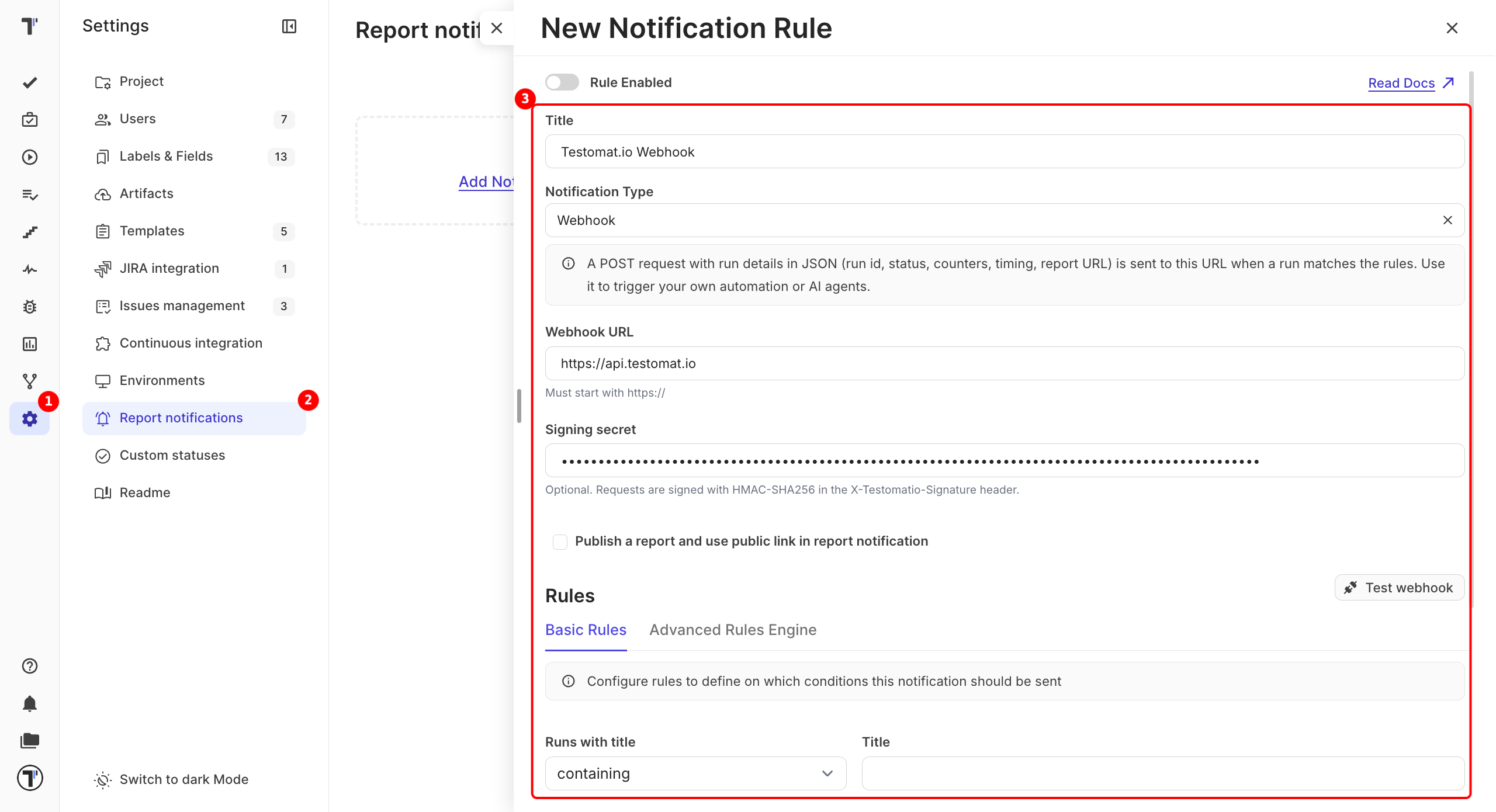
Section titled “Set Up a Webhook”- Open Settings and go to Report notifications.
- Click Add Notification Rule.
- Enter a Title for the rule.
- Select Webhook in Notification Type.
- Paste your endpoint into Webhook URL. It must start with
https://. - Enter a Signing secret if you want to check that requests come from Testomat.io (optional).
- Set the conditions on the Basic Rules or Advanced Rules Engine tab, for example: send only when the run has failures.
- Click Test webhook. Testomat.io sends a sample run to your endpoint.
- Turn on Rule Enabled at the top of the form.
- Click Save.
What the Request Contains
Section titled “What the Request Contains”Each request is a POST with a JSON body and these headers:
| Header | Value |
|---|---|
Content-Type | application/json |
User-Agent | Testomatio-Webhook |
X-Testomatio-Event | run.finished |
X-Testomatio-Signature | sha256=<signature>. Sent only when a signing secret is set. |
The body includes the project, the rule that fired, and the run:
| Field | What it holds |
|---|---|
id, url | The run ID and a direct link to the report. |
status | The run status. |
passed, failed, skipped, tests_count | Test totals. |
env, labels, plans | The environment, labels, and plans of the run. |
ci_build_url | A link to the CI build. |
rungroup_id, rungroup_path | The run group the run belongs to. |
launched_at, finished_at | When the run started and finished. |
To get test-level details, use the run ID with Public API v2 or the MCP Server.
Check the Signature
Section titled “Check the Signature”A signing secret lets your server make sure a request really came from Testomat.io. When you set one, Testomat.io signs the raw request body with HMAC-SHA256 and sends the result in the X-Testomatio-Signature header. Compute the same signature on your side with your secret and compare the two. If they match, the request came from Testomat.io.
Limits
Section titled “Limits”- Only HTTPS endpoints on public addresses are accepted. Redirects are not followed.
- Your endpoint has 10 seconds to answer. If it fails or returns an error, Testomat.io tries again, up to 5 times.
- Several rules with the same URL and secret send one request per run.
- For a run group rule, the request carries the run whose finish triggered it.
If This Doesn’t Work
Section titled “If This Doesn’t Work”- Nothing arrives. Check that Rule Enabled is on. Then click Test webhook and make sure your endpoint answers with a
2xxstatus within 10 seconds. - The signature doesn’t match. Compute it from the raw body, before your framework parses the JSON.